> ## Documentation Index
> Fetch the complete documentation index at: https://support.dripos.com/llms.txt
> Use this file to discover all available pages before exploring further.

# View Patron Activity

> Learn how to view patron order and loyalty activity

## View Patron Order History

<Tabs>
  <Tab title="Dashboard">
    ### Dashboard

    <Steps>
      <Step title="">
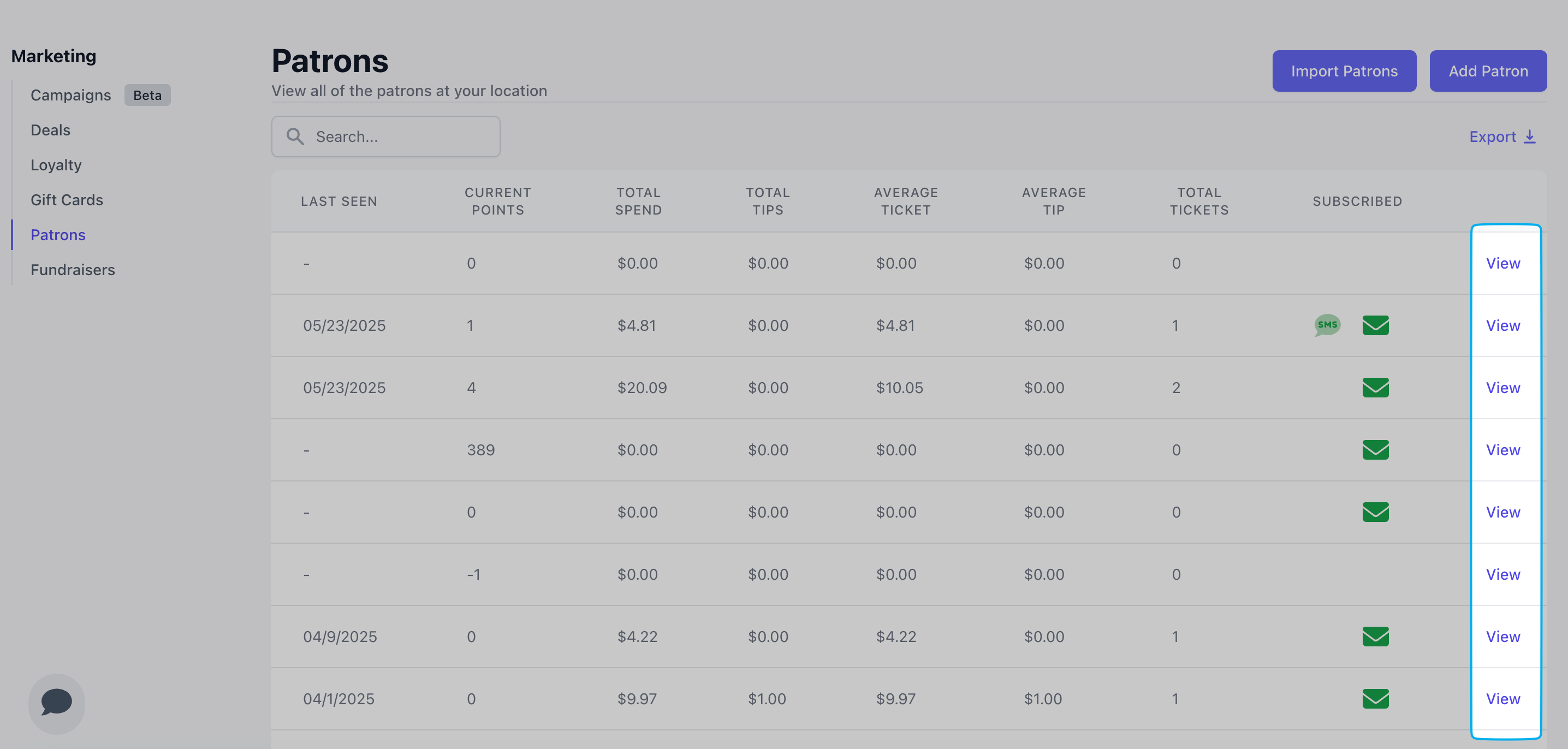
        On the Dashboard, navigate to **Marketing** > **Patrons** > scroll to the right-most column of the patron list and click **view** on a patron
        <Frame>
          <img src="https://mintcdn.com/frostbytetechnologiesinc/mTVmRq9WKaPzORrS/images/marketing/pat14.png?fit=max&auto=format&n=mTVmRq9WKaPzORrS&q=85&s=d2f7f67fad4157c6fba4011d4e0d58b5" width="2872" height="1372" data-path="images/marketing/pat14.png" />
        </Frame>
      </Step>

      <Step title="">
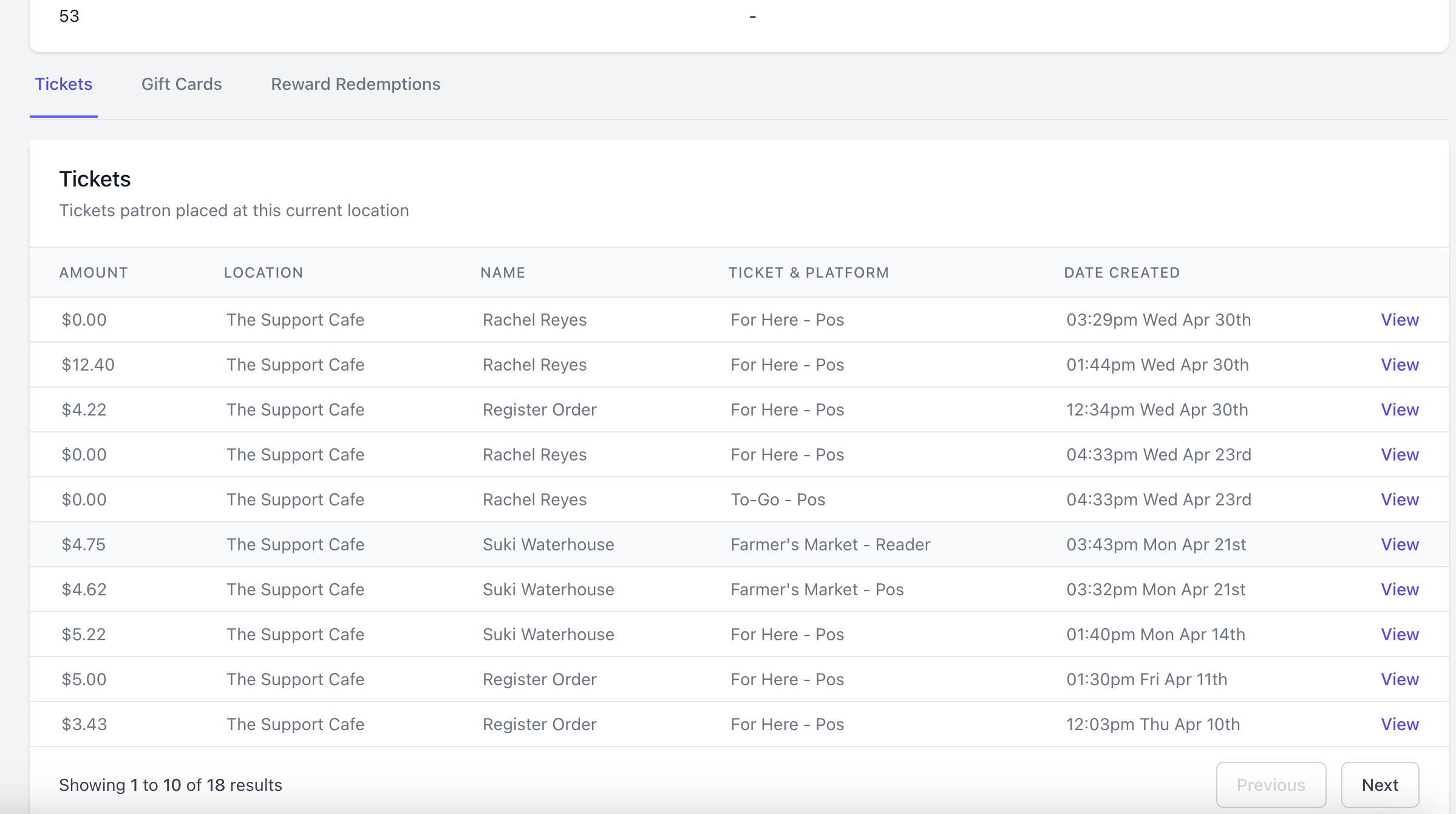
        Scroll to the bottom of the patron profile > click **Tickets** to see all orders placed by this patron.

        Click **View** on an individual ticket to see its order details.
        <Frame>
          <img src="https://mintcdn.com/frostbytetechnologiesinc/PQ1hXtuwuUDdgAEq/images/marketing/pat22.png?fit=max&auto=format&n=PQ1hXtuwuUDdgAEq&q=85&s=f7a8bd52c65f4f9f816fde69502b9be4" width="2398" height="1340" data-path="images/marketing/pat22.png" />
        </Frame>
      </Step>
    </Steps>
  </Tab>

  <Tab title="Point of Sale">
    ### Point of Sale

    <Steps>
      <Step title="">
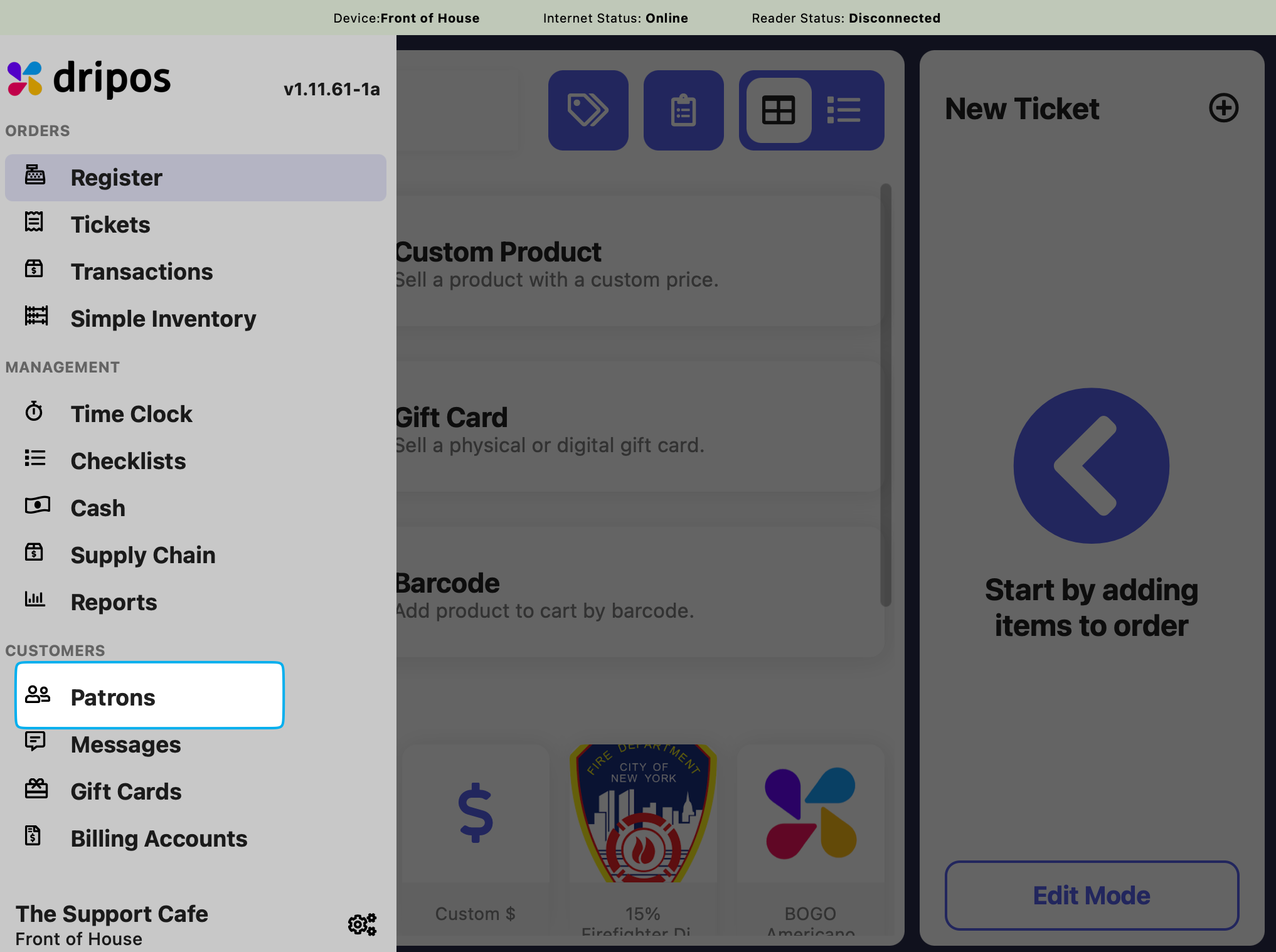
        Press the **tribar** <Icon icon="bars" /> in the upper left screen corner > press **Patrons**
        <Frame>
          <img src="https://mintcdn.com/frostbytetechnologiesinc/mTVmRq9WKaPzORrS/images/marketing/pat1.png?fit=max&auto=format&n=mTVmRq9WKaPzORrS&q=85&s=40eaecc5d6b51e31ae7df91f51b96a2f" width="2034" height="1518" data-path="images/marketing/pat1.png" />
        </Frame>
      </Step>

      <Step title="">
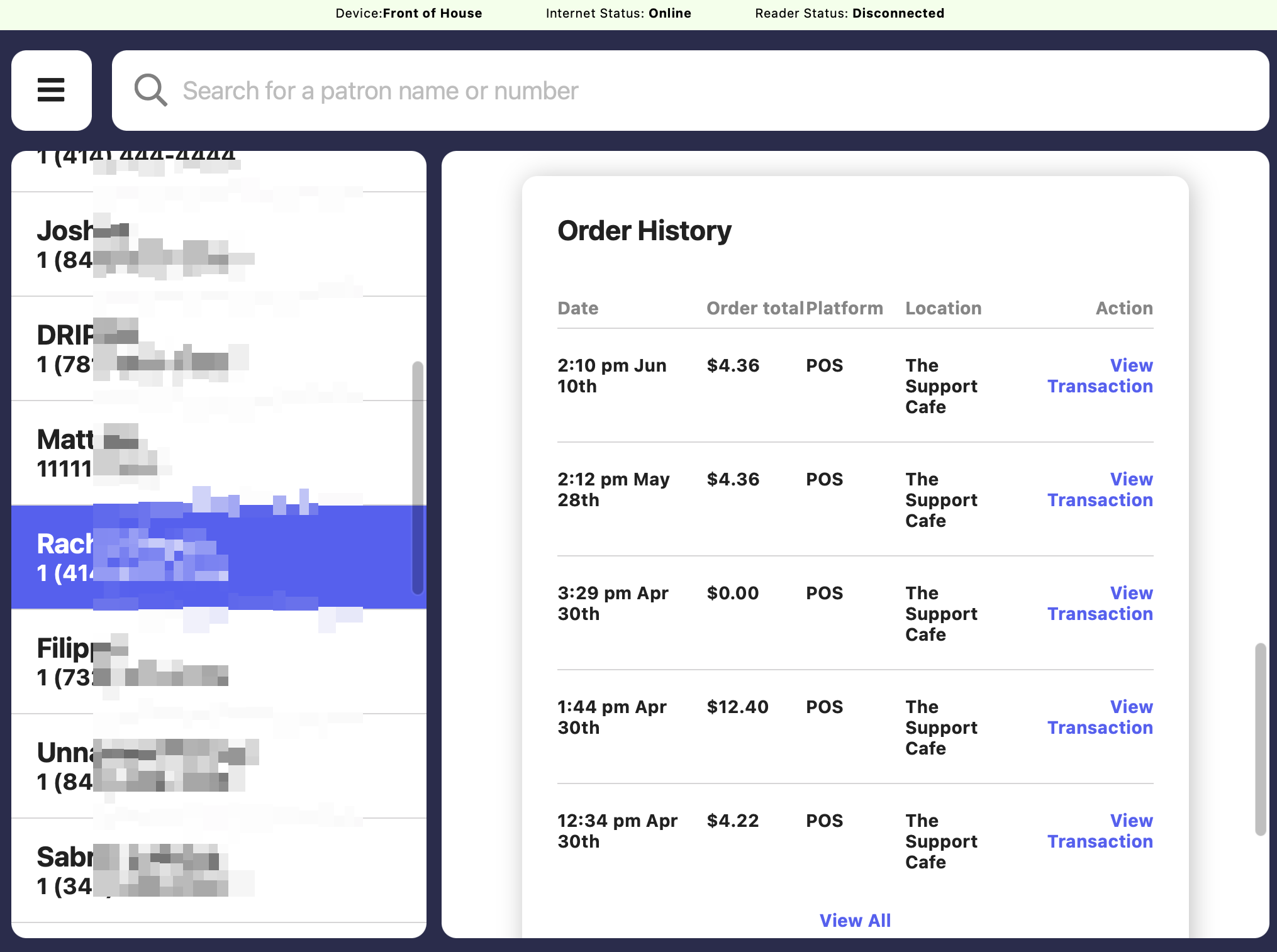
        Find the patron and scroll down within their account's page to the bottom to view **Order History**
        <Frame>
          <img src="https://mintcdn.com/frostbytetechnologiesinc/BQdcLoSppoBn1ck7/images/orders/patrhist.png?fit=max&auto=format&n=BQdcLoSppoBn1ck7&q=85&s=d804d58871994465fc052fd16544c261" width="2030" height="1514" data-path="images/orders/patrhist.png" />
        </Frame>
      </Step>
    </Steps>
  </Tab>

  <Tab title="Order App">
    ### Order App

    <Steps>
      <Step title="">
        A patron must first log into the app with their respective phone number.
      </Step>

      <Step title="">
        Press **Orders** at the bottom of the screen to view all orders associated with this patron account.

        <Frame>
          <img src="https://mintcdn.com/frostbytetechnologiesinc/PQ1hXtuwuUDdgAEq/images/marketing/pat27.PNG?fit=max&auto=format&n=PQ1hXtuwuUDdgAEq&q=85&s=bce921db5a9a18dea43c470387f701bc" width="1170" height="2532" data-path="images/marketing/pat27.PNG" />
        </Frame>
      </Step>
    </Steps>
  </Tab>

  <Tab title="Order Website">
    ### Order Website

    <Steps>
      <Step title="">
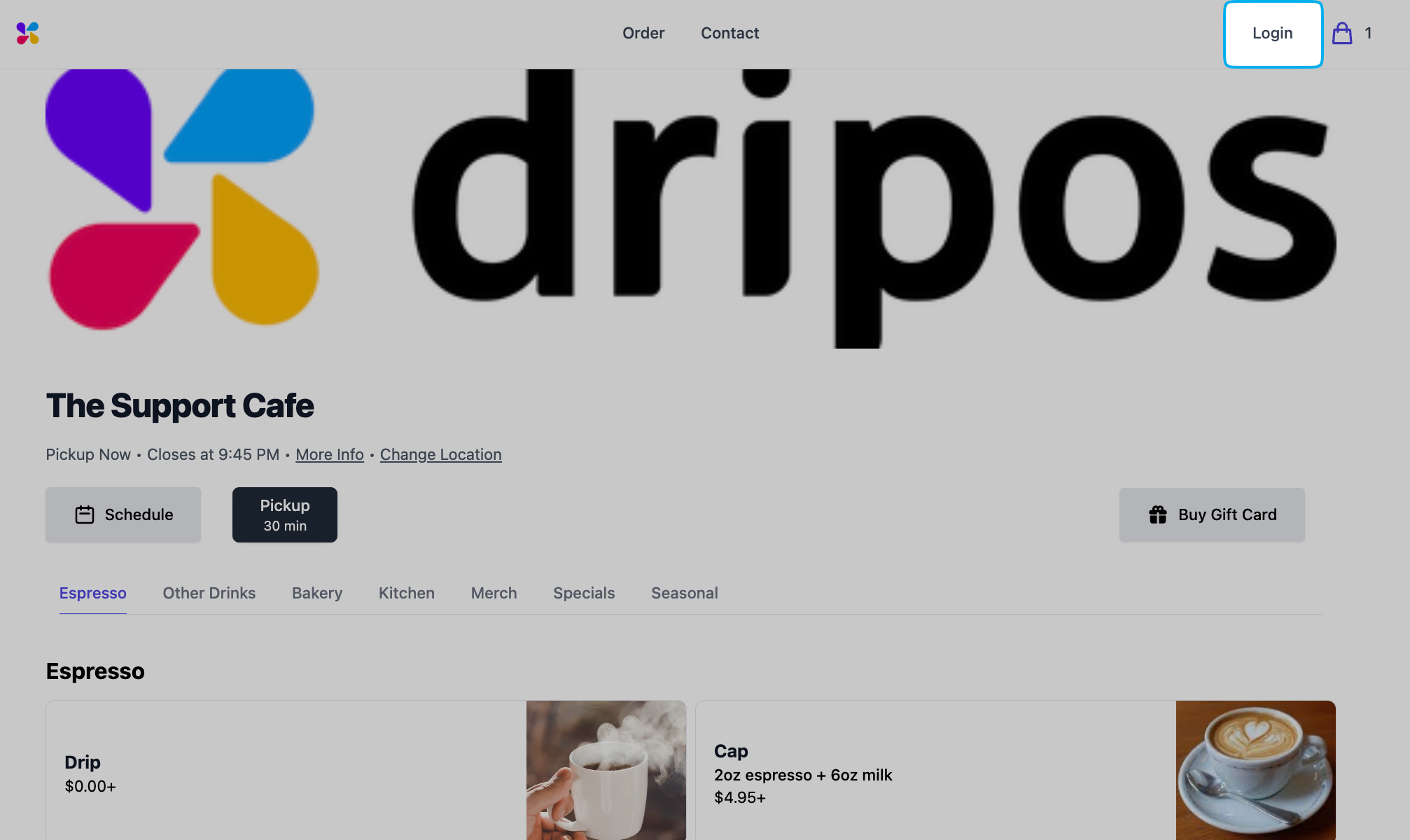
        A patron must first log into the app with their respective phone number.
        <Frame>
          <img src="https://mintcdn.com/frostbytetechnologiesinc/PQ1hXtuwuUDdgAEq/images/marketing/pat28.png?fit=max&auto=format&n=PQ1hXtuwuUDdgAEq&q=85&s=5ef7dee216d98412f08dec8994ef5751" width="2014" height="1200" data-path="images/marketing/pat28.png" />
        </Frame>
      </Step>

      <Step title="">
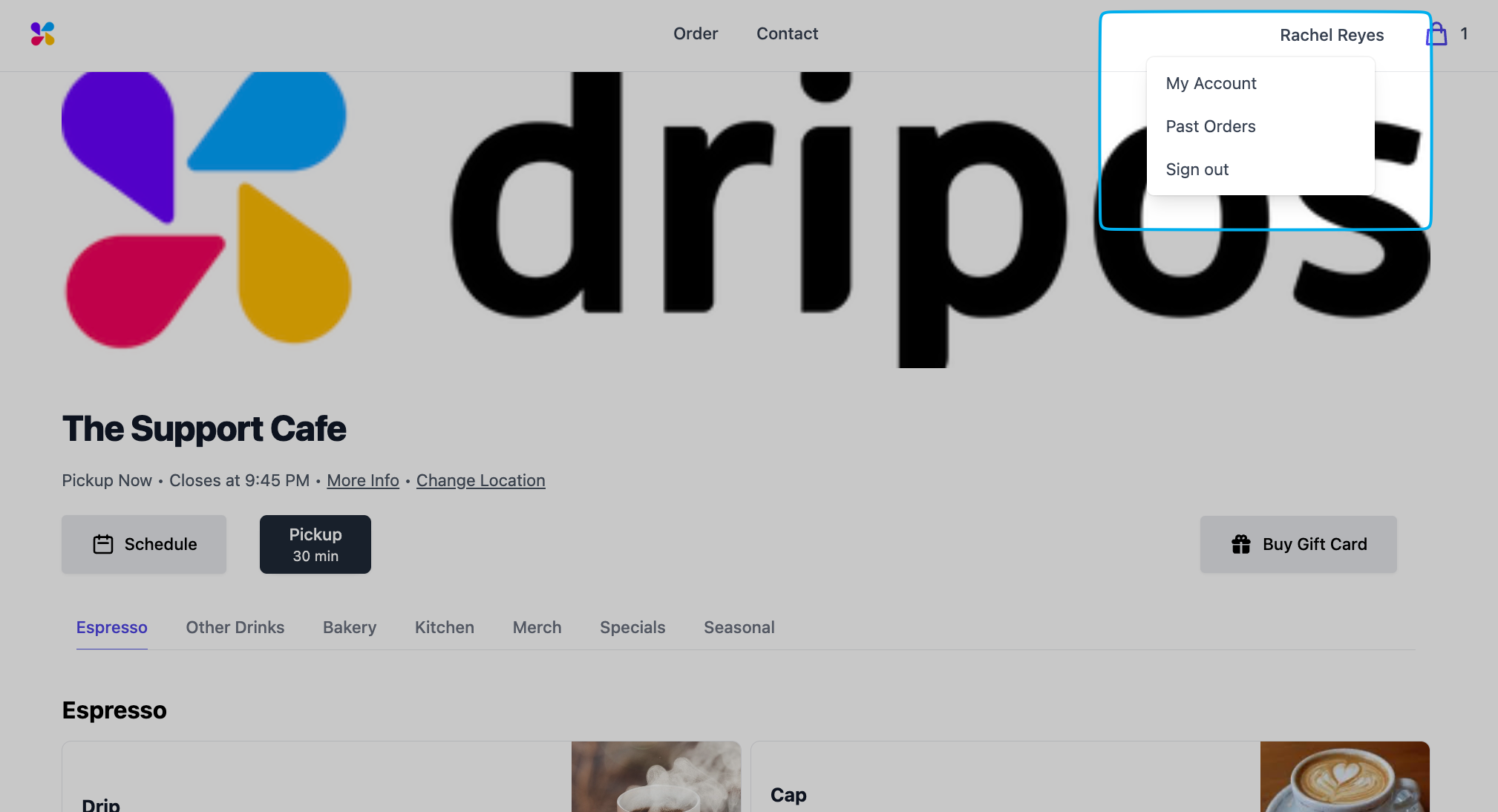
        Once logged in, the patron will click on their name in the upper right corner > **Past Orders**
        <Frame>
          <img src="https://mintcdn.com/frostbytetechnologiesinc/PQ1hXtuwuUDdgAEq/images/marketing/pat29.png?fit=max&auto=format&n=PQ1hXtuwuUDdgAEq&q=85&s=17bd46037b328ed8f3048f7dd3368dc8" width="2018" height="1094" data-path="images/marketing/pat29.png" />
        </Frame>

        <Frame>
          <img src="https://mintcdn.com/frostbytetechnologiesinc/PQ1hXtuwuUDdgAEq/images/marketing/pat30.png?fit=max&auto=format&n=PQ1hXtuwuUDdgAEq&q=85&s=c8b35738de25c403a321c9ae35ae719f" width="2040" height="1476" data-path="images/marketing/pat30.png" />
        </Frame>
      </Step>
    </Steps>
  </Tab>
</Tabs>

***

## View Patron Loyalty History

<Tabs>
  <Tab title="Dashboard">
    ### Dashboard

    <Steps>
      <Step title="">
        On the Dashboard, navigate to **Marketing** > **Patrons** > scroll to the right-most column of the patron list and click **view** on a patron

        <Frame>
          <img src="https://mintcdn.com/frostbytetechnologiesinc/mTVmRq9WKaPzORrS/images/marketing/pat14.png?fit=max&auto=format&n=mTVmRq9WKaPzORrS&q=85&s=d2f7f67fad4157c6fba4011d4e0d58b5" width="2872" height="1372" data-path="images/marketing/pat14.png" />
        </Frame>
      </Step>

      <Step title="">
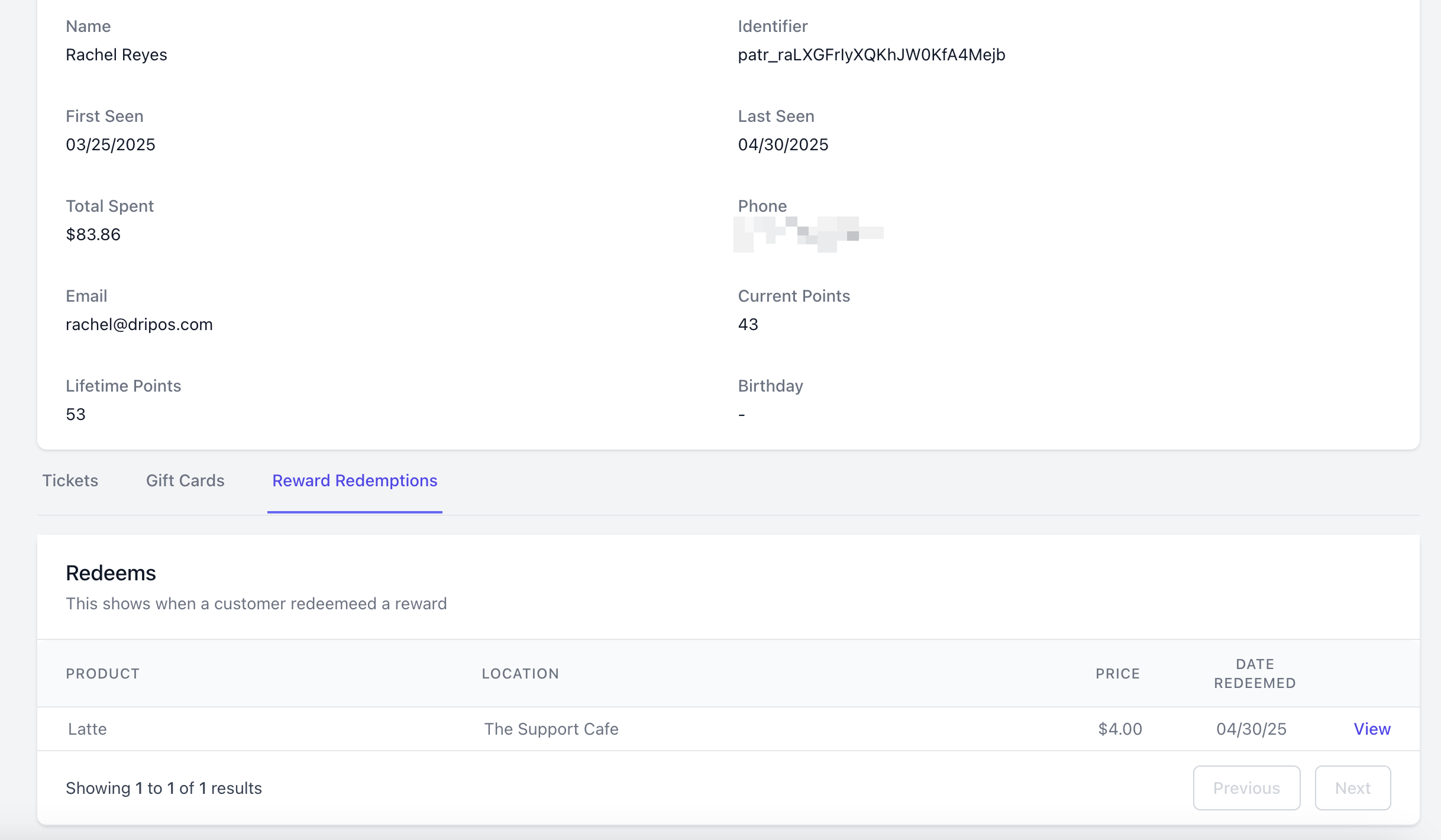
        Scroll to the bottom of the patron profile > click **Reward Redemptions** to see all loyalty redemptions by this patron

        Click **View** on an individual redemption to see the order details.
        <Frame>
          <img src="https://mintcdn.com/frostbytetechnologiesinc/PQ1hXtuwuUDdgAEq/images/marketing/pat23.png?fit=max&auto=format&n=PQ1hXtuwuUDdgAEq&q=85&s=1b984457726fb4f07a38228efac17ff1" width="2436" height="1420" data-path="images/marketing/pat23.png" />
        </Frame>
      </Step>
    </Steps>
  </Tab>

  <Tab title="Point of Sale">
    ### Point of Sale

    <Steps>
      <Step title="">
        Press the **tribar** <Icon icon="bars" /> in the upper left screen corner > press **Patrons**

        <Frame>
          <img src="https://mintcdn.com/frostbytetechnologiesinc/mTVmRq9WKaPzORrS/images/marketing/pat1.png?fit=max&auto=format&n=mTVmRq9WKaPzORrS&q=85&s=40eaecc5d6b51e31ae7df91f51b96a2f" width="2034" height="1518" data-path="images/marketing/pat1.png" />
        </Frame>
      </Step>

      <Step title="">
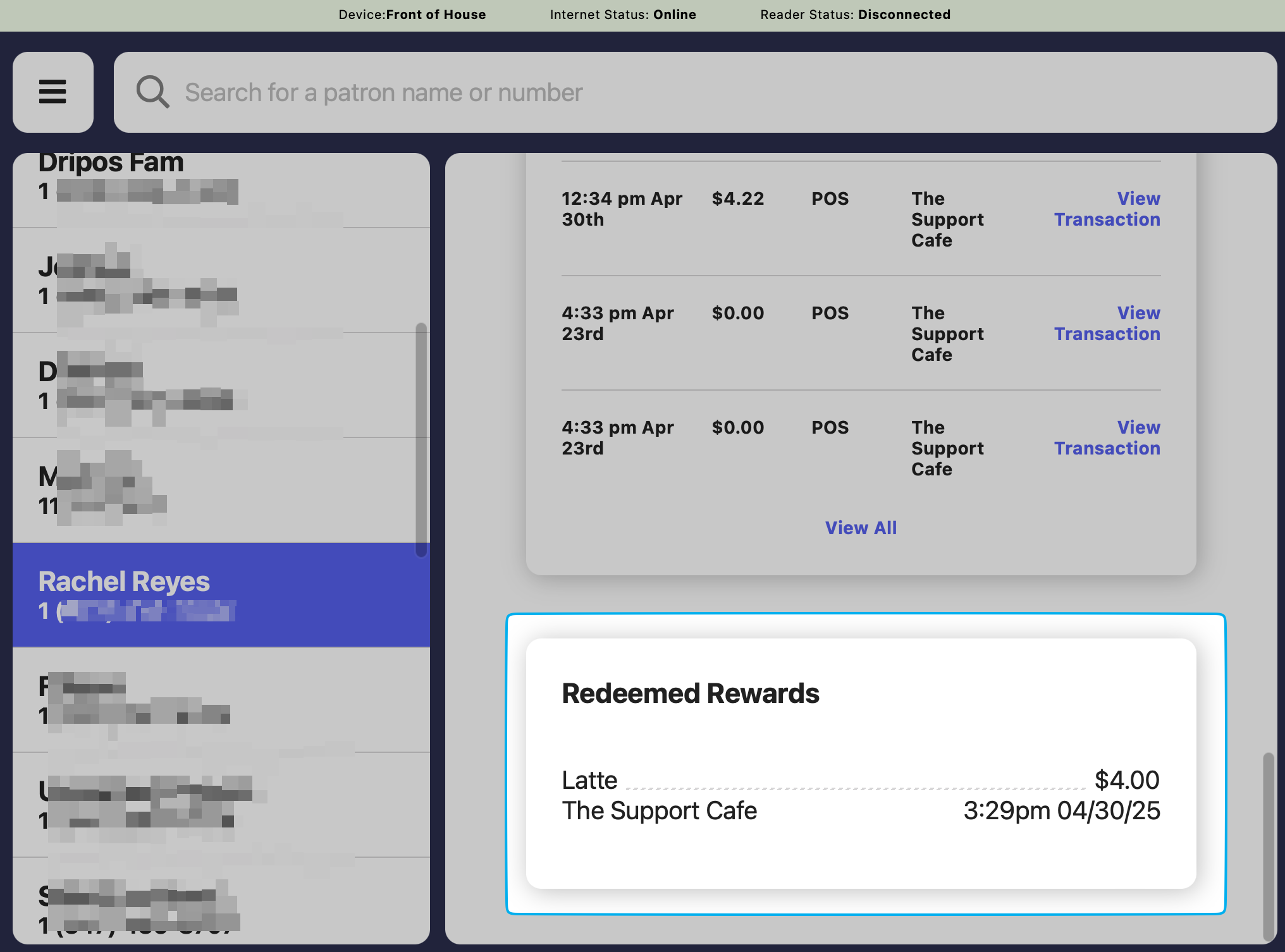
        Find the patron and scroll down within their account's page to the bottom to view **Redeemed Rewards**
        <Frame>
          <img src="https://mintcdn.com/frostbytetechnologiesinc/PQ1hXtuwuUDdgAEq/images/marketing/pat25.png?fit=max&auto=format&n=PQ1hXtuwuUDdgAEq&q=85&s=d79ac8edd78c2869afdc7fb1ddb59c77" width="2032" height="1506" data-path="images/marketing/pat25.png" />
        </Frame>
      </Step>
    </Steps>
  </Tab>
</Tabs>